Colocation.
Packaging Guidelines
When shipping your hardware to nulled., it is incredibly important to ensure that you package it up properly. Postal services all seem to be intent on playing football with your packages these days, so these guidelines have been learned (sometimes the hard way) on what to do and not to do.
Please note! Not following these guidelines can lead to damage! If your package did not meet or exceed these guidelines, we cannot be held responsible for damage and you’ll need to pursue an insurance claim with your shipping service. Likewise, if we did not take our own advice, we’ll fully reimburse you for any damage up to and including full replacement.
Our recommendations are as follows:
Servers, Networking Gear, or Anything “Rack” Width
- Use a double walled cardboard box that covers the length and width of the server plus at least 1 inch on top and 2 inches on each side for packaging material.
- Packaging materials should be sturdy. That paper you get from Amazon boxes won’t do, and please do not send us packing peanuts. Use cardboard supports, high density foam, fitted styrofoam, or even those self-expanding foam inserts for best results.
- Take power supplies OUT of all equipment and place in a separate box inside the main box or wrap in individual packing material. Time and time again these stick out from the edge of the server chassis and get wildly bent, sometimes leading to power distribution board damage, which means your server isn’t turning on without extensive repairs.
- Take all rack ears and rack mounting rails off the server and include in a separate box in the main box or wrapped individually, as these stick out from the chassis and are liable to get bent, sometimes to the point of not being usable.
Valuable Parts, such as RAM, Drives, PCIe Cards, etc.
- For RAM, use anti-static bubble mailers, and use ONE MAILER PER STICK of RAM. For shipping multiple sticks of RAM, use a larger bubble mailer to encapsulate the smaller mailers. You shouldn’t need an outer box for this, but it never hurts to add one.
- Approved bubble mailers can be found here and here .
- For drives, hard-shell 3.5” drive protectors can be used to armor both 2.5” and 3.5” drives in shipping. For 2.5” drives, to prevent shifting during mailing, use the anti-static bubble mailer above to fill the space. Ship these in a standard box with packaging material. Do not ship it directly in the case. You can find approved cases here .
- For PCIe cards, they should fit into the anti-static bubble mailers listed above. However, these cards are larger than RAM and could be subject to bending, so be sure to ship it also in a suitably durable box with packaging materials.
Standalone Parts such as SFPs, Cables, USB Flash Drives, Bezels, Drive Sleds, etc.
- We don’t usually see damage on these parts, but the general rules above apply - if it is electronic, use an anti-static bubble mailer. If it is not electronic, but long, ensure you wrap it accordingly in sturdy packing materials so it doesn’t get bent.
- Try not to ship items in their original factory packaging. I know it may be tempting, but usually that packaging is insufficient. Always use an outer box for these items so they don’t get lost, damaged, or stolen (if it is valuable).
Here are some images of damage we’ve seen ourselves, it’s not pretty:
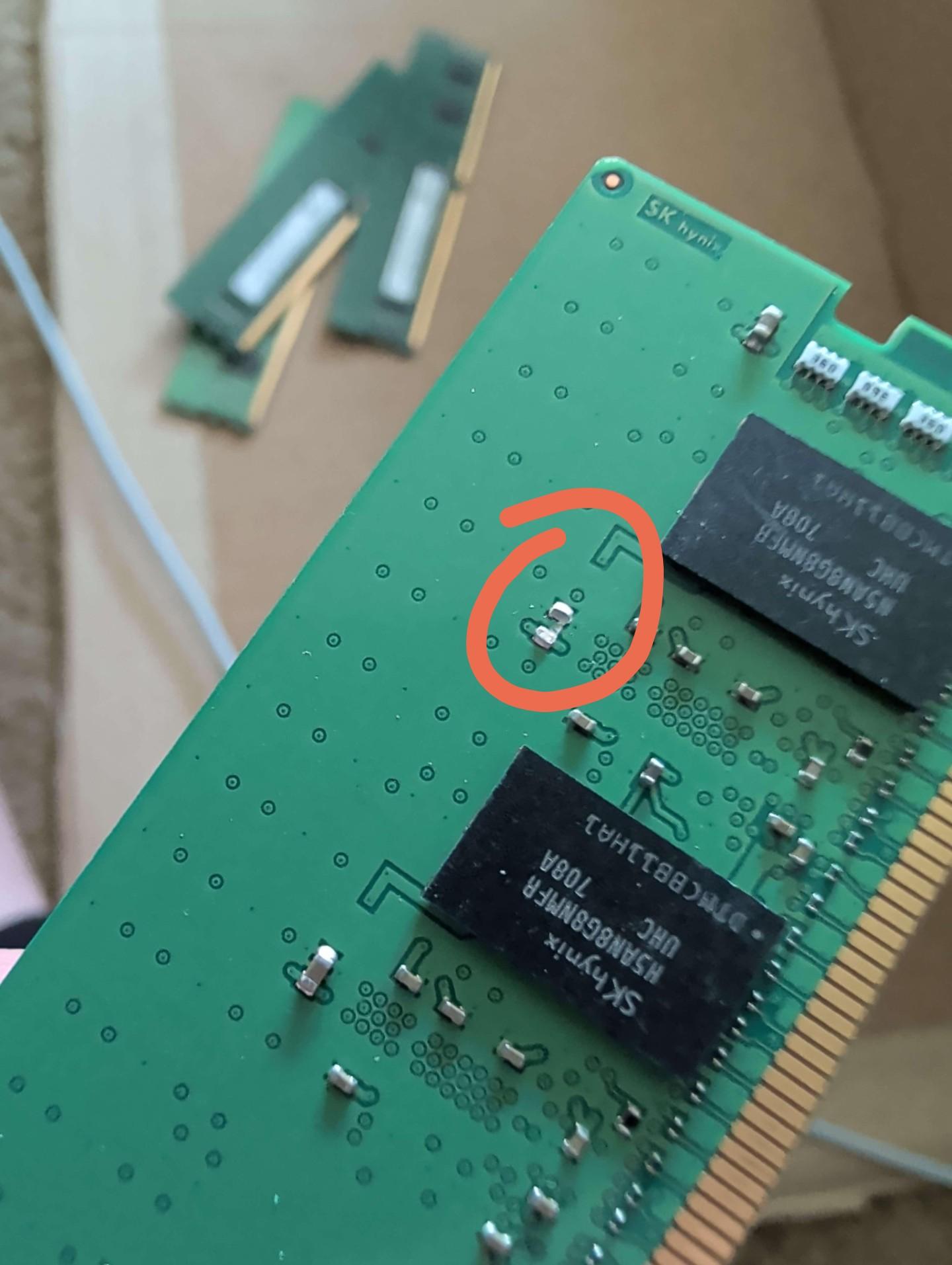
This capacitor was completely sheared off. Someone must have used the box as a makeshift maraca.
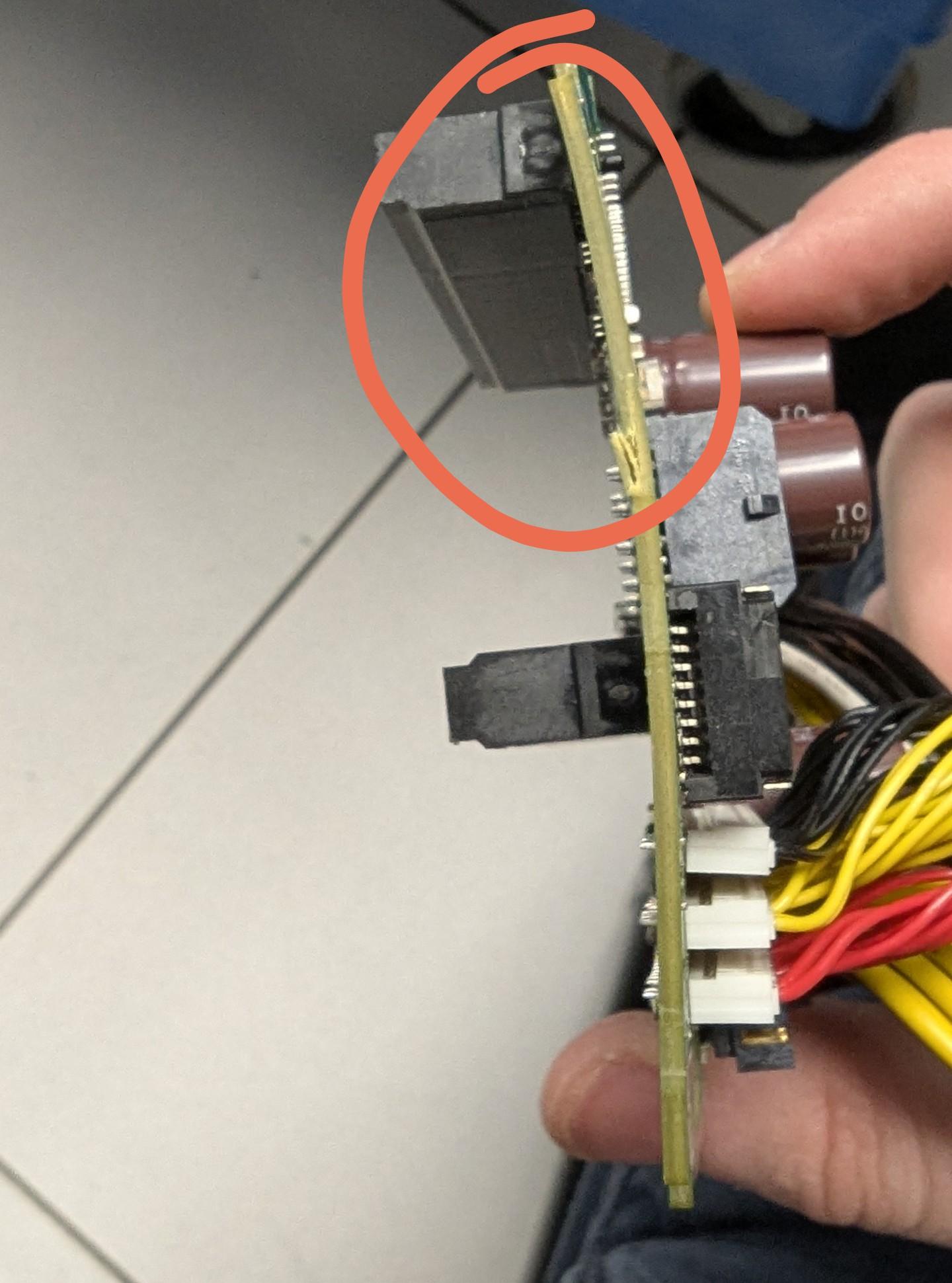
Bent like a banana, this power distribution board needed a complete replacement and two hours of me, the chassis, and pliers.
We want your hardware to make it to our datacenters and back into your hands safe and sound. You cannot trust that the various postal services (USPS, FedEx, UPS, DHL) will protect your equipment. By assuming that your package will endure an EF-3 tornado and subsequent lunch break volleyball match and packaging for it accordingly, you will ensure that your hardware remains in one piece.